

New Newage Admin gives your WordPress dashboard a clean, branded look, from $30 per site. See it in action

WordPress plugin

A WordPress dashboard that looks like your brand

Newage Admin gives the WordPress back office and login screen a clean, modern look. Pick your brand colour once and every admin screen follows it.

$30.00per site

MK 135,000 · Estimate including local taxes and transaction fees

  • 1 site licence
  • 1 year of updates
  • WordPress 6.4+
  • PHP 8.1+
lakesidelodge.example/wp-admin
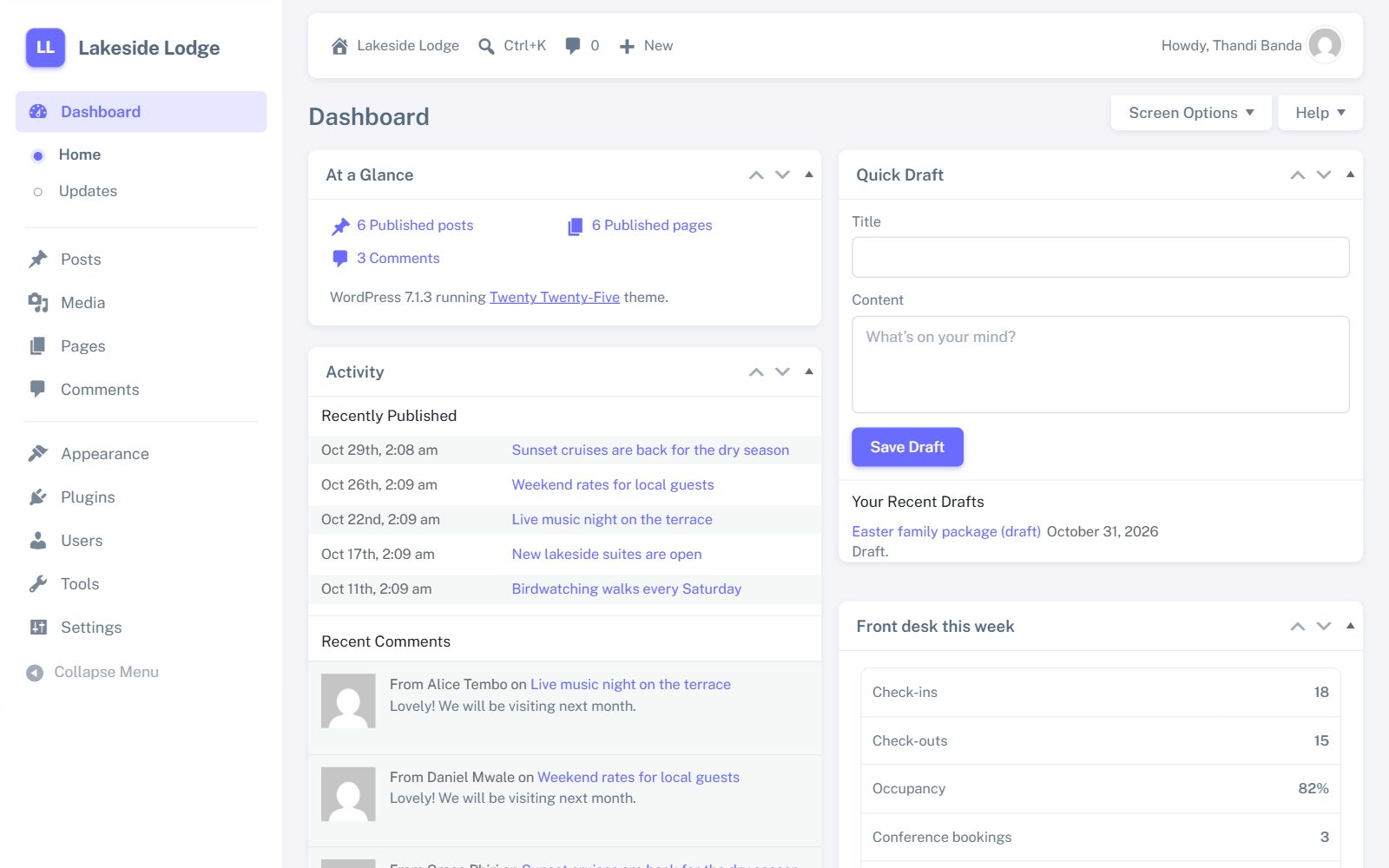
The WordPress dashboard with Newage Admin in purple
Try a colour:

What it changes

Every admin screen, tidied up

Your editors keep the WordPress they know: the same menus, the same steps. It simply looks cleaner and carries your brand. The screenshots are from a demo site.

01

Your brand colour, everywhere

Choose a swatch, use the colour picker or type a hex code under Settings → Admin appearance. The whole screen previews the colour before you save.

  • Hover shades and tints are worked out from your one colour
  • Button text switches between white and dark so it always stays readable
  • Your site icon and name sit at the top of the menu, with initials if you have no icon yet
  • Back to the default with one click
02

A menu that is easy to scan

A white, full-height sidebar with rounded menu items. The section you are in shows as a soft pill and its sub-pages as a short dotted list. The top bar floats above the page as a clean card.

  • The WordPress logo menu and “Thank you for creating with WordPress” footer are removed
  • Your site name appears in the footer instead
  • Public Sans type on a light grey background, with soft card shadows
03

Clean tables, forms and buttons

Lists of posts, pages, users and media get spacious rows and clear headings. Fields, dropdowns, notices and tabs are restyled to match, with solid main buttons and outlined secondary ones.

  • Works across the built-in screens: posts, pages, media, comments, users, settings and tools
  • Other plugins’ screens pick up the same colours, fonts, cards and fields
04

A login page with your name on it

The login screen becomes a centred card with your site icon and “Welcome to” your site name. The logo links back to your website, not to WordPress.org.

05

Just as tidy on a phone

Approve a comment or fix a typo from your phone. The skin adapts to small screens with no sideways scrolling.

Good to know

Light, safe and easy to undo

  • Admin only. Your public website and theme are not touched.
  • Easy to undo. Deactivate the plugin and WordPress looks exactly as it did before.
  • Small. A few small style and script files, loaded only in the admin area and on the login page.
  • Block editor. The post and page editor keeps WordPress’s own look on purpose, so writing works as normal.
  • Other plugins. Screens from plugins such as Wordfence get the colours, fonts, cards and fields, but keep their own layouts.

Questions

How do I install it?

In WordPress, go to Plugins → Add New → Upload Plugin, choose the zip you downloaded after checkout and click Activate. Enter your licence key when asked, then pick your colour under Settings → Admin appearance.

Will it change how my website looks to visitors?

No. Newage Admin only styles the WordPress admin area and the login screen. Your theme and public pages stay exactly as they are.

What happens after the first year?

The plugin keeps working. Renew if you want new versions and support to continue.

Can I use it on more than one site?

Each licence covers one site. Buy one licence per site, or email us about several sites.

Does it work with my other plugins?

Yes. It runs alongside them, and their settings screens pick up your colours and fonts. A few plugins with their own complex layouts keep those layouts.

Can you set it up for me?

Yes. If we host or build your website we can install it and set your colours. Contact us.

Contact

Talk to a person in Malawi or Zambia

Malawi (HQ)

Plot No. CH/M/115, Shop No. 3
Hillcrest Ave, Chilomoni, Blantyre

sales@newagesolutions.africa
Newage Solutions
Privacy Overview

This website uses cookies so that we can provide you with the best user experience possible. Cookie information is stored in your browser and performs functions such as recognising you when you return to our website and helping our team to understand which sections of the website you find most interesting and useful.